You will be using only four chords for your composition project. But that is really all you need!
After you watch this video, do these theory exercises to prepare for our next project.
1. Note Naming Review (Complete 25 Correct)
2. Keyboard Note Naming Review (Complete 30 Correct)
3. Reverse Keyboard Note Naming Treble Clef (Complete 25 correct)
4. Reverse Keyboard Note Naming Bass Clef (Complete 25 correct)
SONGS in 4 CHORDS
Journey -- "Don't Stop Believing"
James Blunt -- "You're Beautiful"
Black Eyed Peas -- "Where Is the Love"
Alphaville -- "Forever Young"
Jason Mraz -- "I'm Yours"
Train -- "Hey Soul Sister"
The Calling -- "Wherever You Will Go"
Elton John -- "Can You Feel The Love Tonight" (from The Lion King)
Akon -- "Don't Matter"
John Denver -- "Take Me Home, Country Roads"
Lady Gaga -- "Paparazzi"
U2 -- "With Or Without You"
The Last Goodnight -- "Pictures of You"
Maroon Five -- "She Will Be Loved"
The Beatles -- "Let It Be"
Bob Marley -- "No Woman No Cry"
Marcy Playground -- "Sex and Candy"
Men At Work -- "Land Down Under"
Theme from America's Funniest Home Videos
Jack Johnson -- "Taylor"
Spice Girls -- "Two Become One"
A Ha -- "Take On Me"
Green Day -- "When I Come Around"
Eagle Eye Cherry -- "Save Tonight"
Toto -- "Africa"
Beyonce -- "If I Were A Boy"
Kelly Clarkson -- "Behind These Hazel Eyes"
Jason DeRulo -- "In My Head"
The Smashing Pumpkins -- "Bullet With Butterfly Wings"
Joan Osborne -- "One Of Us"
Avril Lavigne -- "Complicated"
The Offspring -- "Self Esteem"
The Offspring -- "You're Gonna Go Far Kid"
Akon -- "Beautiful"
Timberland featuring OneRepublic -- "Apologize"
Eminem featuring Rihanna -- "Love the Way You Lie"
Bon Jovi -- "It's My Life"
Lady Gaga -- "Pokerface"
Aqua -- "Barbie Girl"
Red Hot Chili Peppers -- "Otherside"
The Gregory Brothers -- "Double Rainbow"
MGMT -- "Kids"
Andrea Bocelli -- "Time To Say Goodbye"
Robert Burns -- "Auld Lang Syne"
Five for fighting -- "Superman"
The Axis of Awesome -- "Birdplane"
Missy Higgins -- "Scar"
Monday, 9 February 2015
Wednesday, 4 February 2015
School Play Music
Your new project is to create some music needed for the school play in the moods listed below. The play is about suicide and recovering from attempted suicide to make a brighter life.
Choose either the 20-30 second scene-change clip:

Choose either the 20-30 second scene-change clip:
- intense
- dark and dreamy
- old-fashioned and sad
- elevator music
- hopeful
Or the 1:30 to 2:00 full song in ABA form.
- thoughtful, but not too depressing pre-show music
- hopeful and upbeat post-show music
- Use loops from the library or your own MIDI creations.
- Consider using MINOR keys (min) for the sad and dark music and MAJOR keys (maj) for the happy and hopeful songs
SUBMIT MP3 with "Play Music Your Mood Your Name" in the title
Due Tuesday, Feb. 10
Here is a photo of the sign-up Gideon by the class.

Tuesday, 27 January 2015
Chopped Up Beatbox
Please submit your Chopped Up Beat Box projects in MP3 and MX6 formats.
Call your projects "Yournamebeatbox"
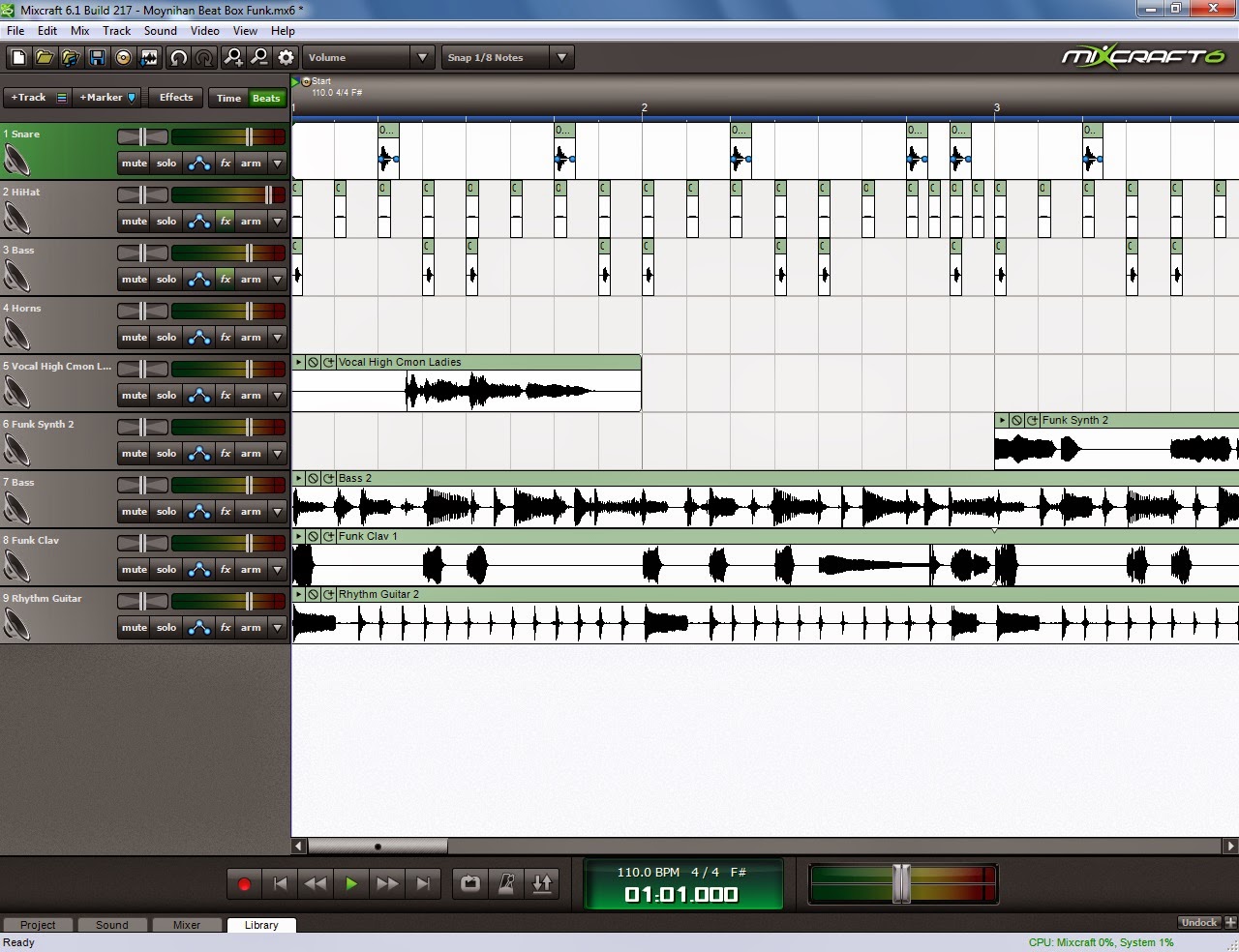
Here is Ms. Moynihan's BeatBox sample.
Here is close up of what your beatbox might look like.

Call your projects "Yournamebeatbox"
Here is Ms. Moynihan's BeatBox sample.
Here is close up of what your beatbox might look like.
Here is an example of what your whole project might look like.
Monday, 19 January 2015
Chopped Up Beat Box Project
You will be using the recorded sounds made in class to create beat box rhythm like the drum beat rhythms you have been taught.
Objectives:
Objectives:
- To Learn to record live sound in Mixcraft
- To learn to split, cut, copy, paste, and move audio sound waves
- To demonstrate a continued understanding of rhythm through drum beat patterns
Important: This is an individual project. Each student will be evaluated separately for their individual creative work. NO DUPLICATE projects will be accepted.
Steps:
- Record your minimum 3 (bass, snare, hi-hat) beat box sounds as a group.
- Retrieve those "raw" and "unedited" files from the Pick-up folder under Moynihan AMM2O1.
- If the tracks are not labeled with sound names ("Bass Drum" etc. ) do that now.
- Choose the sounds you like the most and zoom in.
- Right click at the beginning of the sound and "Split" the region.
- Right click at the end of the sound and "Split".
- Right click and "Copy" the small sound region.
- Turn on "Snap to: 1/8 Notes"
- Paste the sound clip into a new Track and label that track. Remember to line the notes up in the bar with on the correct beats to build a drum beat like the ones we have used.
- Basic Drum beat example: Bass drum on beat 1 and 3, Snare on 2 and 4, Hi-Hat on 1+2+3+4+.
- Repeat this process with each sound (minimum 3) and give EACH sound a track.
- Your drum beat must be a total of 16 bars, with the first 8 and the last 8 a different pattern.
- When done the drum beat, delete the "Raw" recordings and save.
- Create the rest of your song using bass, chords and lead (minimum). DO NOT ADD DRUM OR BEATS. You may use as many sounds as you like.
- Your song must have an A section and a B section of 8 bars each.
- Think of A B form as Verse and Chorus.
- This website has some good examples of the AB (Verse-Chorus) form.
- Add an intro for extra creative marks.
- Mixdown and submit as MP3 and MX6
Due Tuesday, Jan. 26.
Wednesday, 14 January 2015
Introduction to Recording in Mixcraft
Today we will be exploring recording in Mixcraft together as a class.
Overview:
Members of the class will record their voices making beat box sounds. Students will be the recording engineer and producer for these recording artists.
Once raw recordings are made, students in the class will split, cut and paste the sounds into a full beat box drum kit rhythm like the ones you have learned.
While you wait for your turn to record, prepare 16 bars of bass, guitar and other instruments of your choice (not drums) that will go along with your beatbox drum kit.
These 16 bars must be broken up into two sections of 8 bars each that are different from each other in some way.
Listen carefully in class for instructions on recording.
Tuesday, 6 January 2015
Brother John Round Assignment
This is a continuation of the Brother John piano song you recorded last class.
Objectives:
Objectives:
- Understand the concept of a round.
- Match instrument sounds with a genre of music.
- Learn to transpose a melody down an octave.
- Compose a bass line using I and V
- Create a drum beat to match your style of music.
Steps:
- Record the melody and label it Melody 1.
- Record the chords and label the track Chords
- Copy and paste the melody into a new track 2 more times in bars 3, 5, and 7. (We had originally copied it 3 times, but only 2 times is required.)
- Label these tracks Melody 2 and Melody 3
- Choose a Genre of music and pick three melody instruments that match that genre. ONE of the instruments MUST be a low pitched instrument.
- For example: Genre: Jazz; Instruments: 1. Trumpet, 2. Saxophone, 3. Trombone (low pitched instrument)
- IMPORTANT: Complete this Form before continuing to the next step.
- Open the piano roll for one of your melodies and open MIDI editing.
- Transpose ONE of your melody tracks down (minus) 1 octave. (Very important: -1 Octave) This is the track that will be used for your low pitched instrument.
- Now, add the sounds from your genre to your other Melody tracks.
- Add the sound you have chosen for your Chord Instrument to the Chord track.
- Add a New Virtual Instrument Track and compose a 1 bar bass line pattern using C (I) and G (V) notes. Compose it in the lower octave of your piano.
- Loop your bass line.
- Choose a Bass instrument for your bass line to match your style. Transpose it down 1 octave if needed.
- Create a drum beat for your piece that matches your style. Your drum beat must have Bass Drum, Snare Drum and Cymbals of some kind.
- Mixing:
- Pan your Melody, Chord and Bass tracks to different sides to create a stereo sound.
- Adjust your track levels so that melodies are clearly and equally heard.
- Add a Master Compressor effect.
- Turn off metronome and mixdown to MP3. Submit both MP3 and MX6 file. (Label the file Brother John Your Name)
Monday, 5 January 2015
Piano Practice 2
Happy New Year!
Today we will be practicing our piano skills in preparations for our upcoming projects.
Brother John MP3
Instructions:
Today we will be practicing our piano skills in preparations for our upcoming projects.
Brother John MP3
Instructions:
- Open a new Mixcraft "Virtual Instrument" project. Choose a keyboard instrument for your first track.
- Practice the C Chord shape here, but don't record it yet.
- Brother John is the song we will record using our left and right hands separately. Read the melody (right hand, treble clef) first and practice the notes slowly. The last two bars include the right and left hand in the melody.
- When you are confident, record the melody using a metronome on a slow speed (60-90 BPM)
- Quantize to 1/4 note.
- Then, record the left hand chords in a new track so that they match up with the melody.
- Quantize to 1/4 note.
Subscribe to:
Posts (Atom)